¶ What is the Diri control matrix?
The Diri control matrix is a visualisation of how the treatments (security controls) in your risk assessments are categorised and how far they are implemented. It is filled from the risk assessment and the treatment plan, and lets you drill down into the details. The control matrix makes it easy to see gaps in your controls, and to audit systems and organisations.
You find it on the risk assessment dashboard, below the registration and assessment process. It is also available as the Control Matrix widget for dashboards and reports.
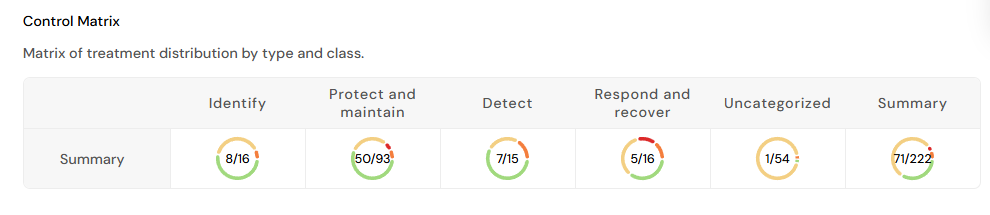
¶ Information in the control matrix
The matrix shows four kinds of information:
- Columns: the treatment class, based on the cybersecurity framework:
- Identify - developing the organisational understanding to manage risk to systems, assets, data and capabilities.
- Protect and maintain - safeguarding the delivery of services and protecting assets (mainly probability-reducing measures).
- Detect - identifying the occurrence of a security event.
- Respond and recover - acting on a detected incident, and maintaining resilience plans and restoring capabilities or services impaired by an incident.
- Rows (when expanded): the treatment type:
- Physical controls are barriers in the physical domain, such as door locks, card readers and fences.
- Technological controls are the technical barriers often associated with cybersecurity, such as firewalls, network monitoring and encryption.
- Administrative controls are security policies, guidelines, routines and organisational security measures.
- People controls address personnel security, such as hiring processes, awareness, training, NDAs and remote working.
- Uncategorized: both axes have an uncategorised group for treatments that have no class or type.
- The numbers in each square show how many treatments have been implemented out of the total number of treatments in that square.
- The pie chart around the numbers shows the status of the treatments in the square.
Use Expand table to see the rows, and the framework filter to measure the controls against a specific standard such as ISO 27001 or NIS2. The framework filter uses the treatments' control tags.
¶ Analysis in the control matrix
The summary view is shown first, as illustrated above. Even this view gives useful information. Ø means that the square has no treatments. In the example there is one control to Identify, but none implemented or planned in this class. Only 6 of 31 protection measures are in place (green in the pie chart), while several are planned (orange) or ongoing (yellow). Only one Detect measure is in place, while one is planned and another proposed. Respond and recover is read the same way. In total, 8 of 41 measures are in place for this system.
Expand the matrix to see more. The fully expanded matrix holds a lot of information, but is a handy tool for finding gaps in the chain of controls:

An interpretation of the matrix above:
All treatments in the example have been categorised, so the Uncategorized squares are empty. In the Identify class there is one administrative control. Using Diri for risk assessments is itself an identifying control, and could be added both as a technological control and as an administrative routine.
The Protect and maintain class has 31 controls, but only 6 are implemented. The need for physical controls depends on location and hosting. Self-hosted systems need to be secured at the right level, while the service provider often meets the physical security requirements for a cloud application. Still, those requirements should be written into the contract.
Technological controls are typically associated with cybersecurity, but many of them need an Administrative control as well, such as a routine for appropriate use. A typical example is plenty of technological detection controls, such as logging and monitoring, but no administrative routine to actually analyse the logs.
Click a square in the matrix to drill down:

Click a treatment in the details to open it for viewing and editing. A treatment that lists several causes or consequences reduces risk for all of them.
¶ When to use the control matrix
We have only scratched the surface of the control matrix, and you may find even better ways of using it.
One good use is as a compliance tool for the organisational risk assessment. If you manage several organisations or units and want all of them to assess a standard set of risks and controls, create a template or copy an assessment to reuse the control set in each sub-organisation. Combined with the control matrix, this gives you an excellent tool for auditing and tracking progress in the overall security work.
The same approach works for IT systems, and the control matrix also works for auditing a single system, as shown above. It immediately highlights missing controls and missing implementation.