¶ Copying whole risk assessments
Are you happy with one of your assessments? Or is the same IT system used in several places? An existing risk assessment can be copied and reused in other parts of the organisation, or in another module.

¶ How to copy a risk assessment
- Open the risk assessment you want to copy.
- On the risk assessment dashboard, click Copy in the top right corner.
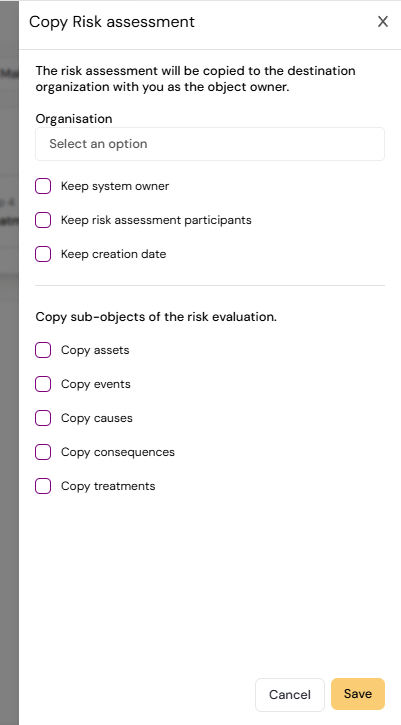
- In Copy Risk assessment, choose the destination organisation. The copy is placed there with you as the owner.
- Choose what to keep: Keep system owner, Keep action plan, Keep risk assessment participants and Keep creation date.
- Under Copy sub-objects of the risk evaluation., choose what to include: assets, threats, vulnerabilities, events, causes, consequences and treatments.
- Optionally choose another module in Copy to module. Diri warns you that the copy will appear in that module and not in your current one.
- Save.
¶ Other ways to reuse
- To reuse the same content in many assessments, make a template instead of copying.
- To duplicate assessments from the list, select them in the risk assessment list and use Duplicate under Action.
- To move content in from spreadsheets, use Bulk import.