¶ How access works
What a user sees and may do in Diri comes down to a few concepts. Read this page first; the pages it links to explain how to set each one. You find the same overview in Diri under Users & Access > How access works.
¶ Where a user is
Everything in Diri lives in an organisation tree: your top organisation, with sub-organisations such as subsidiaries, departments or projects below it. Each customer's tree is closed: nothing in it is ever visible to another customer.
A user has three things, which you see in the user form:
- Member of – the organisations the user can work in. Membership alone gives no access; roles do.
- Roles – what the user may do, given per organisation. A user can be User Risk in one organisation and Auditor in another.
- Working in – the organisation the user is in right now. They change it with the organisation switcher at the top of the page. Everything they create is stored there, and what they see there comes from the role they hold there, or a role that reaches there from above.
Roles from different organisations are never combined. The role that applies is the one held in the organisation the user is working in. If they hold none there, the nearest role above that reaches down applies.
¶ The three settings
Three settings decide what a user sees and may do in the tree. Each is set in one place, and each answers one question:
| Question | Setting | Where you set it |
|---|---|---|
| What do users see of the tree? | Role reach: whether a role also covers the organisations below the one where it is held. | Per organisation, on its Access and sharing tab: Roles reach the organisations below. |
| What may they open? | Restricted roles: whether User Risk, User Privacy and User Compliance open everything they may read, or only their own records and what is shared with them. | Per role, in Access Control or on the organisation's Access and sharing tab. |
| What is offered to the organisations below? | Offering below (inheritance): whether a record or the organisation's settings are visible, and editable, in the organisations below. | On each record's form, and on the organisation's Access and sharing tab for settings and for what new records start with. |
The first two settings are about people: how far a role reaches and how much of it a user may open. The third is about content: which records and settings travel down the tree. Sharing is the fourth way content reaches someone: you give a named user access to one record. See Sharing and collaboration.
¶ Administrators
An Admin role always reaches from the organisation where it is held and downwards, never upwards, whatever role reach says. An Admin at the top sees the whole tree. An Admin further down sees that organisation and the ones below it, and does not see the levels above or beside it.
¶ An example
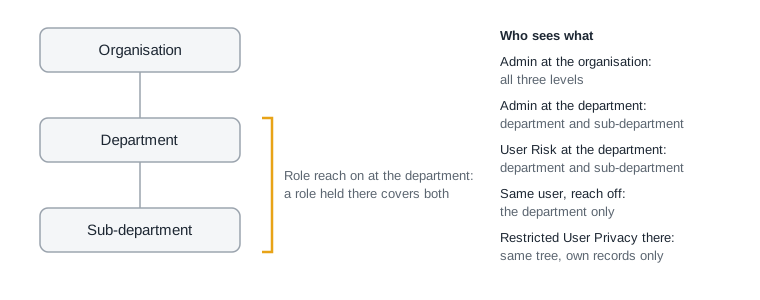
- An Admin at the organisation sees everything from there down: organisation, department and sub-department.
- An Admin at the department sees the department and the sub-department, but not the organisation above.
- A User Risk at the department sees the department and the sub-department in one list, because role reach is on at the department.
- If role reach were off at the department and above it, the same user would see the department only.
- A restricted User Privacy at the department sees the same tree, but opens only their own records and what is shared with them.
Records that the organisation at the top has offered below, such as a shared threat library or a common IT system, are visible to users in the department and the sub-department as well. They see them read-only unless the record allows changes.
¶ Checking the effect
You don't have to work out the effect yourself. Each card on an organisation's Access and sharing tab ends with an Effect now line that says what the setting does in that organisation right now, and the Who sees what here box at the bottom lists what each role sees there.
¶ The default roles
| Role | What it may do |
|---|---|
| Admin | Everything in this organisation and all organisations below it, including users, roles and settings. |
| User Risk | Create and edit risk assessments, treatments and the registers. Read incidents. |
| User Privacy | As User Risk, plus data processing activities and DPIAs. |
| User Compliance | As User Risk, plus reports and incidents. |
| Auditor | Read everything the user roles can edit. Cannot change anything. |
| Read and sign | As Auditor, and may sign treatment plans. |
A custom role follows the same rules as the user roles. See Users, roles and permissions.