¶ Diri Release Notes for January 2026
Over the coming months, we are finalizing core functionality to make Diri a more complete GRC platform. In February, we plan to launch a dedicated Governance & Compliance module, including policy management, incident/non-conformity management, reporting, archiving, files, and framework support. This will include ready-to-use content for implementations such as ISO 27001 and NIS2.
Alongside this, we are improving the Privacy module based on customer feedback (starting with Pre-DPIA), strengthening Microsoft MFA with better control and optional passwordless login, and significantly enhancing reporting through predefined dashboards, a completed report designer, and improved PDF outputs.
¶ Sidebar design update: Governance & Compliance module
In short, we are finalizing the Governance & Compliance module. Significant changes brings the introduction of the Policies -feature which allows for policies, guidelines, routines, etc. to be created and shared in Diri. Furthermore, we introduce the incident management feature for dealing with security incidents, non-conformities, and deviations. All existing customers will have the Governance & Compliance module enabled by default under their current subscription terms.
Notably, we are also moving files, archive, and frameworks into this module. We are also moving Vendors & IT systems into an own subcategory.
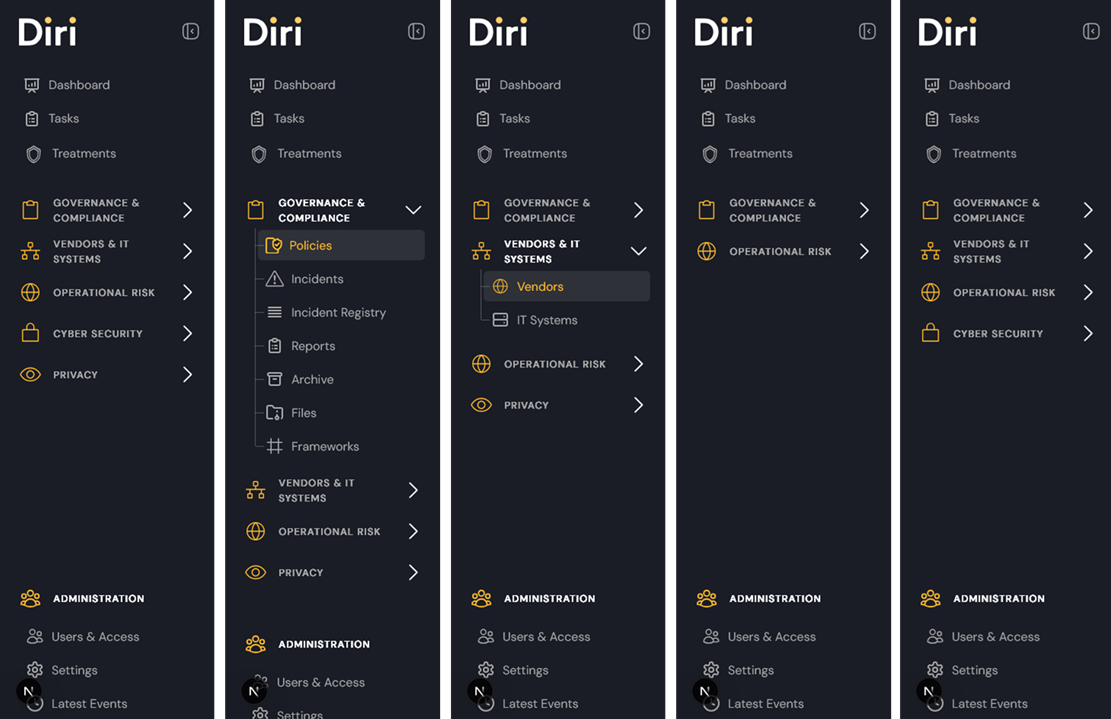
The above figure shows some of the available subscription module configurations. E.g. to the left have all modules enabled.
¶ Microsoft authentication update
The Microsoft authentication settings have been expanded beyond simple tenant allowlisting. The updated configuration now includes branch identification, configurable session token lifetime, and enhanced Microsoft Authenticator controls.
Administrators can define how long users remain logged in before re-authentication is required, and password-based login can be disabled once a valid Entra ID tenant is configured.
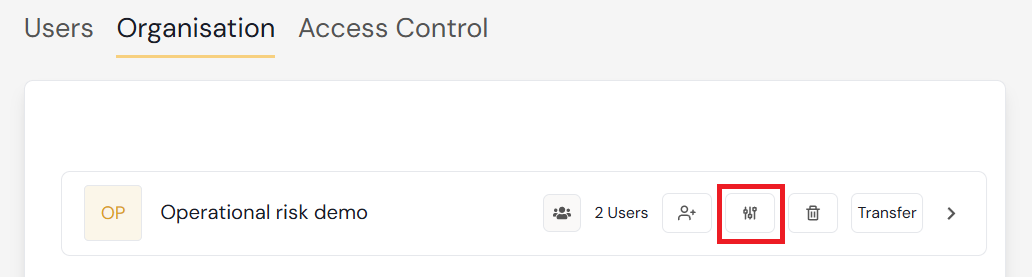
The Sign in with Microsoft setup allows organizations to add their Entra AD tenant and invite users directly from it. Since any user with a valid Entra ID from the tenant can create a user in Diri, we recommend configuring a dedicated sub-organization as a lobby for new Microsoft sign-ins. This prevents unintended access and allows administrators to place users correctly before granting visibility.
Activation requires allowing tenant invitations, registering the Entra AD tenant ID (with potential admin approval in Azure Enterprise Applications), and defining both the landing organization and default role for users signing in via Microsoft.
¶ Upcoming: Template Organizations with Ready-to-Use Content
Ahead of launching template organizations, we are strengthening reporting across Diri. This includes cleaner, more consistent dashboards and improved report templates, ensuring that tasks, risk assessments, policies, and controls are clearly reflected both in-app and in exported reports.
Template organizations will provide ready-to-use tasks, risk assessments, policies, and control frameworks that can be copied into new or existing organizations—significantly reducing setup time for GDPR, ISO 27001, Digitalsikkerhetsloven, NIS2, and similar requirements.
¶ Other updates
¶ Policies
Policy headers & layout
- Fixed issues with policy headers in the editor.
- Document layout updated with corrected margins.
Treatments
- Adding treatments to policies now performs lookups independent of module, ensuring correct items are shown.
Visibility across sub‑organizations
- Policies are now visible across sub‑org structures, following expected access rules.
¶ Risk Assessment
Bowtie – treatments
- The “Add existing treatment” function now displays existing treatments at the top of the list for easier selection.
Consequence – assets
- Fixed an issue where the “Add asset” view under consequence was limited to showing only five assets. Full list now appears.
Bowtie visualization
- A “No treatment defined” box is now shown to prevent bowtie arrows from crossing and improve diagram readability.
¶ Pre‑DPIA
- Button consistency
- Standardized the Pre‑DPIA button display. When a Pre‑DPIA exists, the system now always shows the white “Show Pre‑DPIA” button instead of the yellow “Pre‑DPIA” button in the DPIA menu.
¶ Vendor
- New fields added to vendor records
- Contract end date (Date picker)
- License type (Free text)
- Cost (Free text)
¶ Tasks
- UI improvements
- Added scrollbars to the task column and standardized the column width.
- The task search field has been fixed and now behaves as expected.