¶ What is a DPIA?
A Data Protection Impact Assessment (DPIA) is a process that helps organisations identify, assess and manage risks related to the processing of personal data. The purpose is to ensure that the processing is necessary and proportionate to its objectives while protecting individuals' rights and freedoms.
¶ Why conduct a DPIA?
A DPIA is required when a type of processing is likely to result in a high risk to the rights and freedoms of individuals (GDPR Article 35). This is particularly relevant when using new technology or when the nature, scope, purpose and context of the processing suggest a significant impact. A DPIA helps ensure compliance with data protection regulations and demonstrates that the organisation has taken the necessary measures to meet legal requirements. Use a Pre-DPIA to find out whether a DPIA is needed.
¶ How to conduct a DPIA
To conduct a DPIA, organisations should follow these steps:
- Describe the processing – provide a systematic description of the planned processing activities and their purpose.
- Assess necessity and proportionality – evaluate whether the processing is necessary and reasonable in relation to its objectives.
- Conduct a risk assessment – analyse the risks that the processing may pose to individuals’ rights and freedoms.
- Implement risk mitigation measures – identify and plan actions to manage and reduce risks while ensuring compliance with the GDPR.
It is essential to document the entire process and involve relevant stakeholders, including the Data Protection Officer (DPO) and senior management, to ensure a thorough and effective assessment.
For detailed guidance and checklists, visit the Norwegian Data Protection Authority’s website: datatilsynet.no.
¶ How to conduct a DPIA in Diri
¶ Start a DPIA
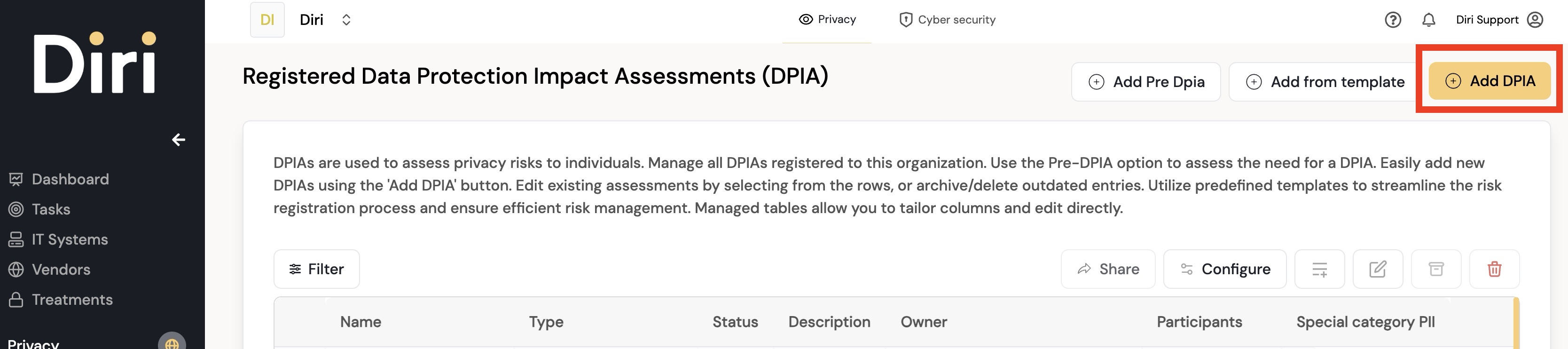
Go to Privacy > DPIA in the left menu. The page lists all registered DPIAs. You can start a new DPIA in several ways:
- From a Pre-DPIA: choose Finish and create new DPIA assessment. The object you assessed is filled in and the Pre-DPIA is linked to the DPIA. This is the usual route for a processing activity.
- Add DPIA – start a new, empty DPIA.
- Add from template – start from a DPIA template. See Using templates.
- Add Pre-DPIA – run a Pre-DPIA first.
- Import DPIAs – import several DPIAs from Excel. See Bulk import.
Each row has a button to Start, Continue or View the DPIA, and View Pre-DPIA when the DPIA was created from one. To create and edit DPIAs you need a role such as User Privacy or administrator.
The DPIA process has five steps: Registration, Privacy Principles, Privacy Risk Assessment, Treatments & cost-benefit and Sign and approve. You can move between the steps in the stepper at the top of the page.
¶ Step 1 Registration
In step 1 you record information about the impact assessment:
- DPIA name and DPIA Owner (the person responsible for the DPIA).
- DPIA type – what is being assessed: a Data Processing Activity, an IT system, the Organisation, an Asset, a Vendor or a specific Problem – and the object itself.
- Who will participate in the assessment, both users in Diri and external participants.
- Description and Delimitations – scope limitations and assumptions made for the assessment.
- Optionally, Add risks from template, and Tags.
¶ Step 2 Privacy Principles
This step documents how the processing complies with the privacy principles. It covers:
- Purpose of data processing – why the processing is carried out, and whether it is necessary or less intrusive alternatives exist.
- Data collection – what types of personal data are collected, the collection methods (e.g., forms, interviews, sensors), and whether special categories of personal data are involved.
- Data sources – where the data comes from (directly from individuals, third parties, public records, etc.).
- Data minimisation – whether the amount of data is proportionate to the purpose.
- Legal basis – the lawful basis for processing, including for sensitive data.
- Data subjects and impact – which groups the data concerns, whether vulnerable groups are involved (children, patients, elderly, etc.), and how individuals are informed and can exercise their rights.
- Data retention – how long the data is kept.
- Data security and sharing – security measures for storage, safeguards when data is shared, and transfers outside the EEA.
- Privacy impacts – potential adverse impacts on individuals' privacy and rights.
¶ Suggestions from the processing activity
When the DPIA assesses a processing activity, Diri fills in several step 2 fields from what is already registered on that activity, so you do not have to write the same information twice. The notice Some fields have been suggested from your linked DPA registration is shown at the top of the step.
Fields that can be suggested include the purpose, the types of personal data, whether special categories are processed, the origin of the data, the legal basis, the categories of data subjects, how individuals are informed, and transfers outside the EEA. How much is suggested depends on how much is filled in on the processing activity; a lean registration for a data processor gives fewer suggestions.
The suggestions are a starting point, not your assessment. Read each one, adjust it to what is true for this DPIA, and fill in the questions that call for your own judgement – such as necessity, data minimisation and the impact on individuals – before you click Next. Once step 2 has been saved, your saved answers are what the DPIA shows.
¶ Step 3 Privacy Risk Assessment
In this step you carry out the risk assessment. Note that it is privacy risks – risks to the individuals whose data is processed – that should be assessed.
Start by identifying undesirable events, their causes and the consequences that may follow. Use Add guided risk to be guided through a risk, Add from template to add events, causes, consequences and treatments from a template, or Import rows to import them.
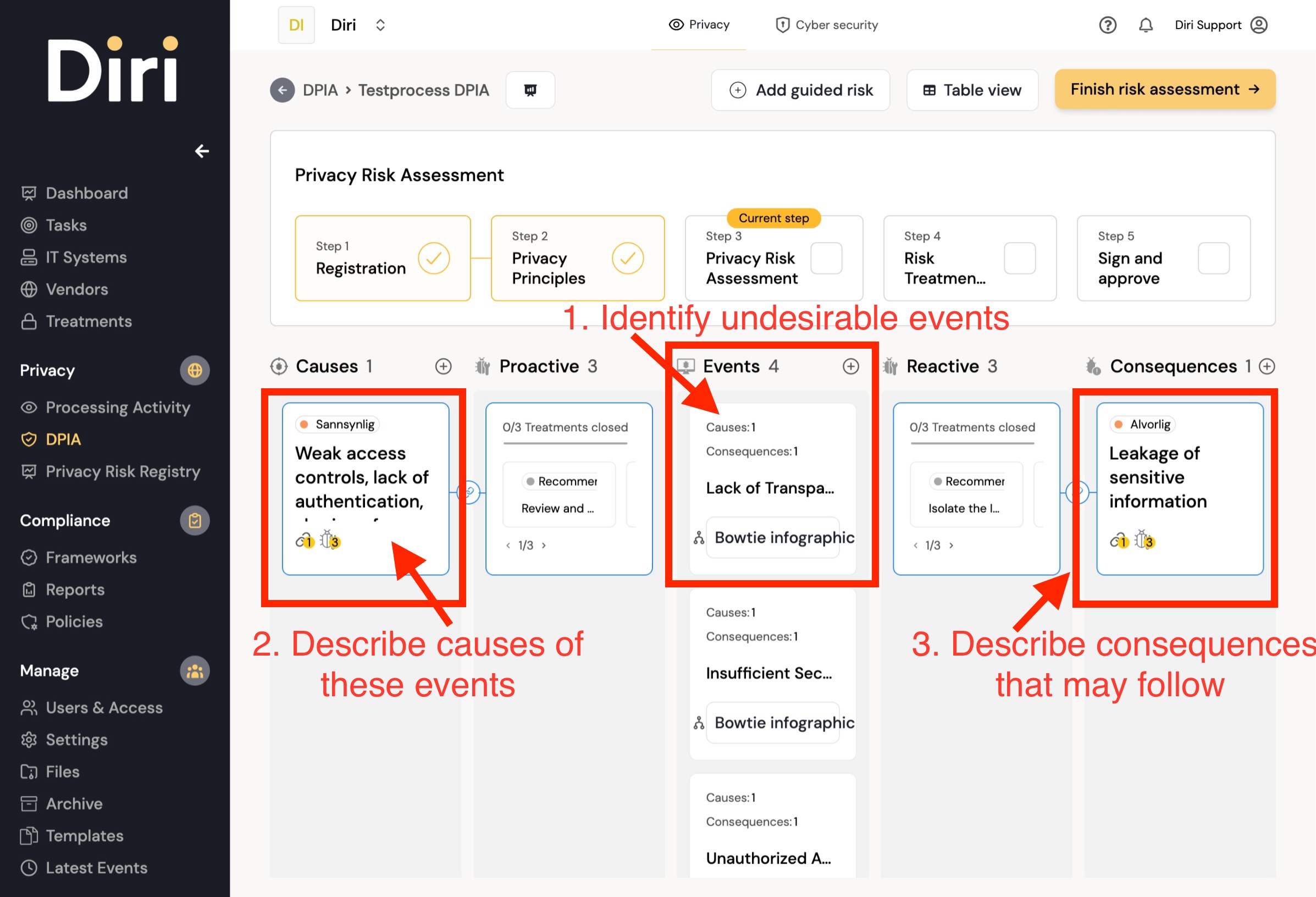
Then propose risk-reducing measures (treatments), both preventive (proactive) and impact-reducing (reactive).

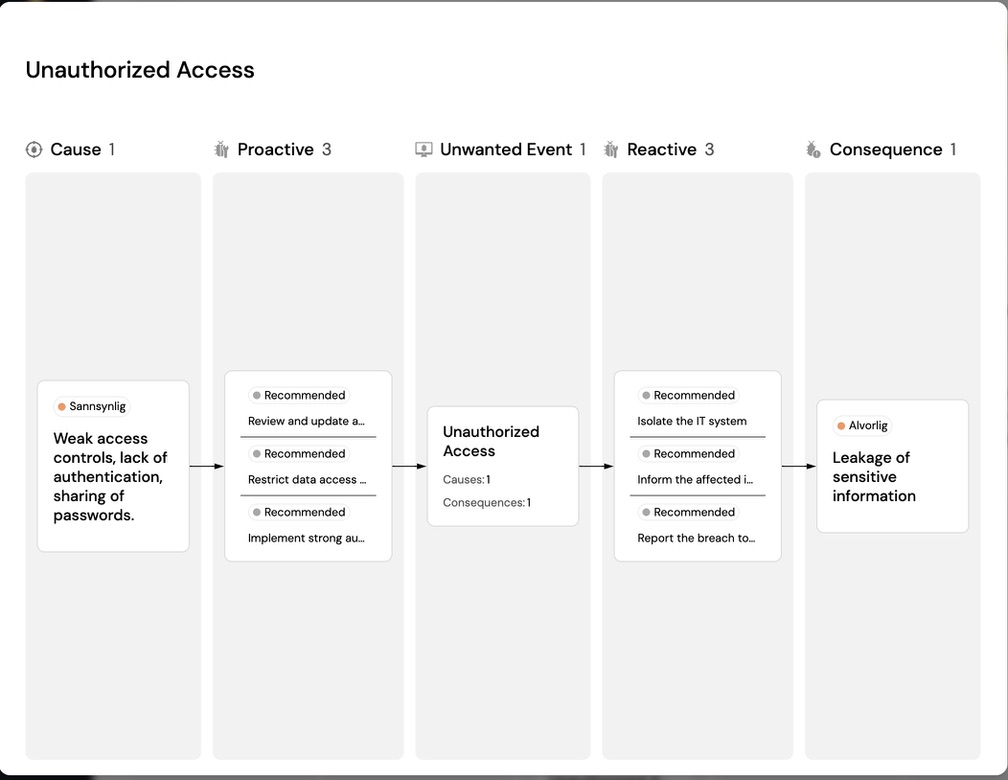
Switch between Table view and Bowtie view to see how events, causes, consequences and treatments are connected. When you are done, click Finish risk assessment, or choose Save and close to finish later. See Risk assessment for more about working with risks and bowties.
The risks you register appear in Privacy > Privacy Risk Registry, together with the privacy risks from your other DPIAs. See Risk registry and Risk acceptance.
¶ Step 4 Treatments & cost-benefit
The treatments you documented in the risk assessment are collected in a treatment plan.

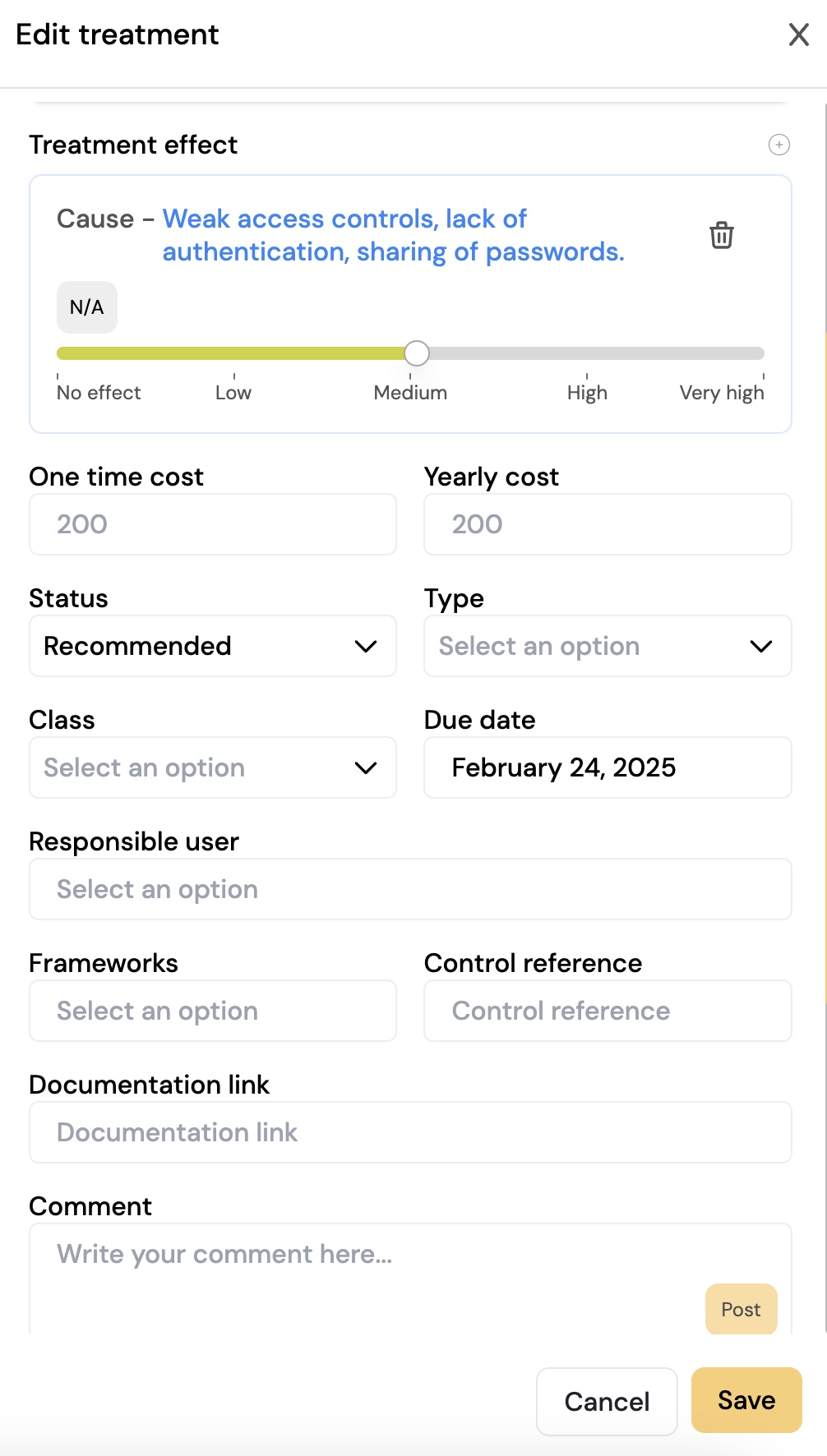
For each treatment you can record who is responsible, the cost of implementation, the deadline and the expected risk reduction, so you can weigh cost against benefit. Click Finish treatment plan when the plan is complete. The treatments are followed up together with your other treatments, see Treatments.
¶ Step 5 Sign and approve
In the last step, the treatment plan and the DPIA are approved and signed by the person responsible in the organisation. You can sign yourself if you have the right, or send the DPIA for signing to someone else. For a DPIA, signing includes:
- Data protection officer consulted and Their advice – required, because GDPR Article 35(2) obliges the controller to seek the DPO's advice.
- Confirming I approve this data protection impact assessment, and accepting the residual risk that remains once the plan is in place.
- A Justification, which is required if risk remains above your acceptance threshold. In that case Diri also warns that GDPR Article 36 requires prior consultation with the supervisory authority before processing begins.
Signing sets the review period for the DPIA. If the risk figures later change so that the conclusion on prior consultation would be different, the signed DPIA says so, and you should review the risks and sign again. Read more in Signing and review.

¶ The DPIA dashboard
Each DPIA has a dashboard that gives an overview of the assessment:
- the DPIA process – where the assessment is in the five steps;
- key information about the DPIA, such as owner and responsibility;
- treatment status, the risk matrix and the control matrix;
- Uploaded documents – attach related documentation or supporting material for the assessment.
DPIA reviews also appear in the Annual wheel, so you can see when each DPIA is due for review.