¶ The Relationship Between Vendors, IT Systems, and Information Assets
When managing information security and privacy, it's important to understand how vendors, IT systems, and information assets are connected. Together they form the foundation of your organisation's digital ecosystem, and they shape the context of your security and privacy work.
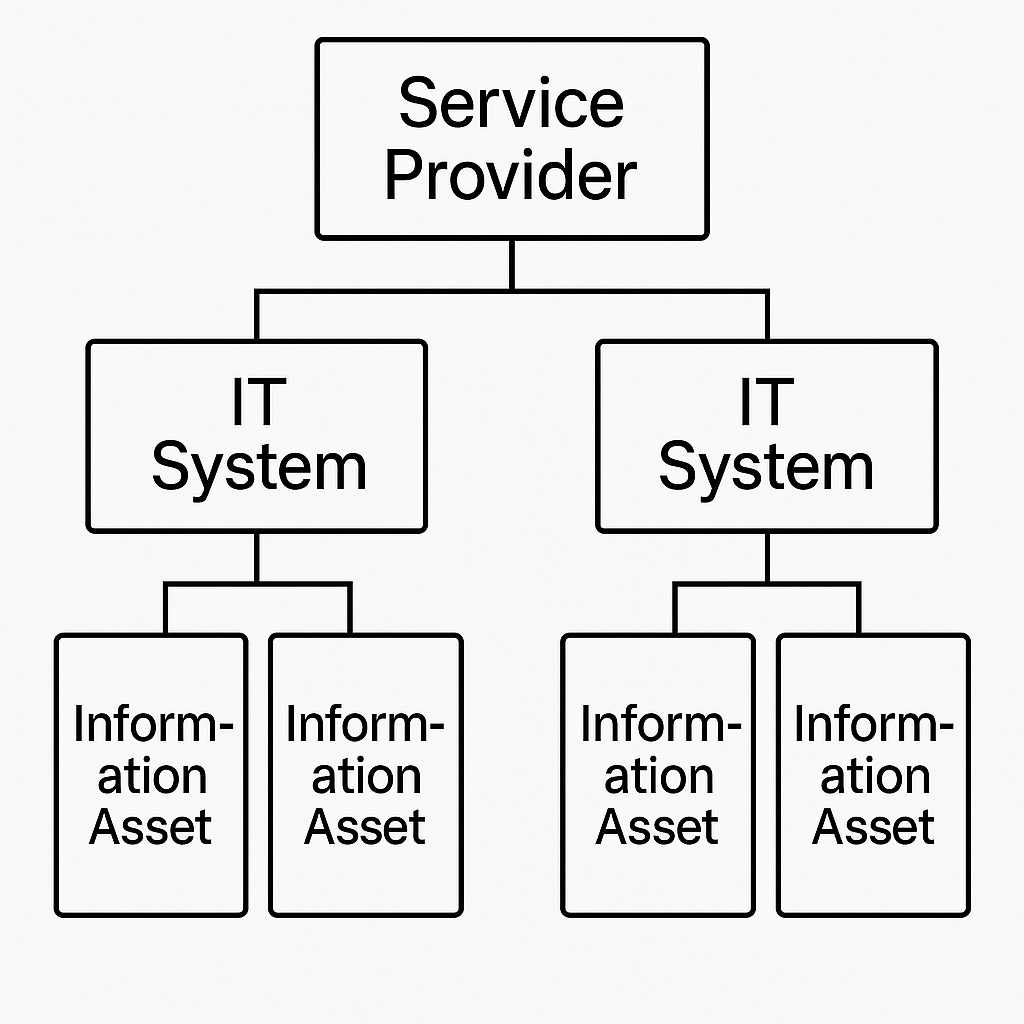
- Security risk assessments can consider an IT system, but also who provides it (the vendor) and what it holds (the information assets).
- Privacy compliance (such as GDPR) requires mapping which vendors process personal data, on which systems, and for what purpose.
- Access control, incident response and data protection measures must be aligned across all three.
You register each of them once and reuse them everywhere: in risk assessments, processing activities, business processes, incidents and as evidence for framework controls.
¶ Where to find the registers
| Menu group | Register | Read more |
|---|---|---|
| Vendors, Systems & Processes | Vendors | Parties and customers |
| Customers | Parties and customers | |
| IT Systems | This page | |
| Business Processes | Business processes and BIA | |
| Dependencies | Dependencies | |
| Assessments | Pre-assessments | |
| Operational risk | Business Assets | This page |
| Cyber security | Information assets | This page |
Vendors, customers and IT systems are available when the Cyber security or Privacy module is active. Asset registries belong to the Operational risk and Cyber security modules. What you see also depends on your role. See Role-based access control.
¶ 1. Vendors
The Vendors register keeps track of the external parties that provide services, software, infrastructure or support, and that may affect your information security or privacy compliance. For example:
- Cloud service providers (e.g. AWS, Microsoft 365)
- Software vendors (e.g. CRM systems, accounting software)
- IT support companies or consultants
The register has two tabs: Suppliers, the parties you have an agreement with yourselves, and Subcontractors, the parties that work for your suppliers. Each supplier can be given a supplier security assessment that calculates a risk score.
Why it matters: Vendors often have access to your systems or data, or process data on your behalf. Their security practices directly affect your organisation's risk.
¶ 2. IT Systems
The IT Systems register gives you an overview of the digital systems your organisation uses, whether they are internal platforms, cloud services or vendor-supplied tools. For example:
- Email platforms
- CRM systems
- Business applications
Select Add IT system to register a system. Important fields include the system owner, the Vendor that provides it and its subcontractors, how important the system is (1–5), the mode of operation, personal data, third-country transfer, availability requirements, the lifecycle status and Is this an AI system?. Each system can be given an IT system security assessment, and AI systems also an AI Act pre-assessment. See Pre-assessments.
What each system depends on (hosting, login, data flows) is mapped in Dependencies. To register many systems at once, use Import IT systems, see Bulk import.
Why it matters: These systems store, process or transmit your organisation's information assets. Any vulnerabilities in these systems can expose data to unauthorised access or loss.
¶ 3. Information Assets
Assets are registered in two registers, one per module:
- Information assets (under Cyber security) – the data and records that are valuable to your organisation, such as personal data, business-critical documents, system configurations and intellectual property.
- Business Assets (under Operational risk) – the assets your operations depend on, for example customer contracts, revenue streams and licences.
IT systems are registered in their own register, not as assets. An asset can be linked to the IT systems that manage it. The asset registries list all the assets you can see, and can be sorted, filtered and searched like other lists. The asset types available are set per module in Settings.
Why it matters: Protecting information assets is at the heart of both information security (confidentiality, integrity, availability) and privacy compliance (e.g. GDPR).
Assets are rated for:
- Confidentiality – How secret is this information?
- Integrity – How dependent are we on the data being correct, complete and up to date?
- Availability – How long can we manage without the information?
The confidentiality, integrity and availability levels are configured under Settings > Asset classification, and the scale applies to every module. See Settings.