¶ Application Programming Interface (API)
Diri is built to support data flow to and from other systems. The API lets you integrate Diri with your existing tools, for example to retrieve data for reporting or for a help desk or ticketing system. API keys are generated per organisation, and only administrators can create them.
¶ Generate an API key
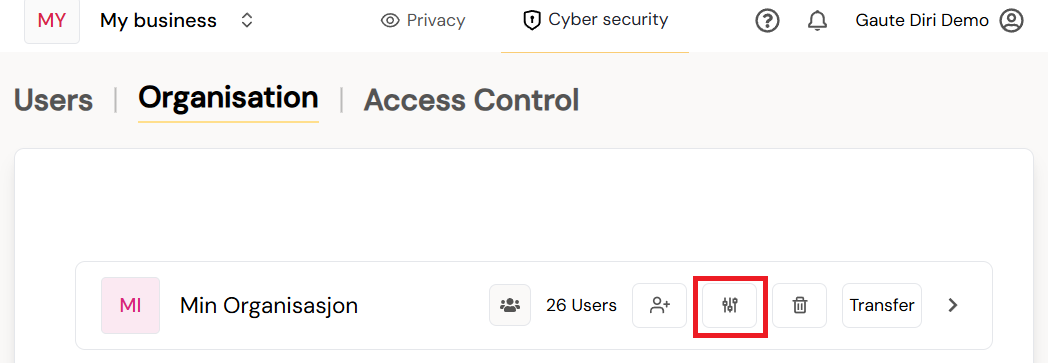
- Go to Users & Access and select the Organisation tab.
- Click the settings icon on the organisation the key should work for. The key gives access to the selected organisation and the organisations below it.
- Select the API tab.
- Enter an API Key Name that tells you what the key is used for, and click Generate key.
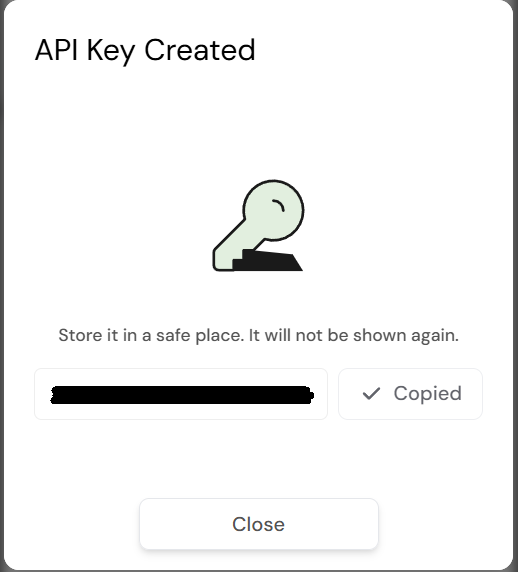
- Copy the key and store it in a safe place. It is shown only once.
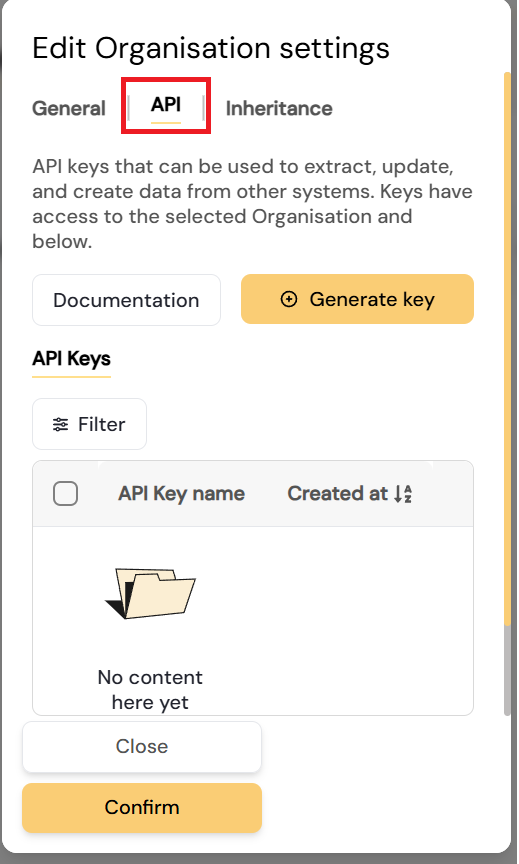
The list of keys shows the name of each key and when it was created – never the key itself. To withdraw access, delete the key.
Treat API keys like passwords. Anyone who has a key can read data from your organisation and the organisations below it.
¶ API documentation
Click Documentation on the API tab to open the API documentation in Diri. It lists the endpoints an API key can call. You must be signed in to Diri to see it.
Send the key in the X-Access-Token header of each request.
Contact support@cyrigo.com for more information about the API.